
Setup web firewall protocols immediately upon launching any cloud server infrastructure to insulate your underlying code, system directories, and database backends from the relentless wave of malicious internet traffic. Operating a public-facing digital platform without an active, intelligent inspection barrier leaves open communication ports vulnerable to automated exploit scripts, credential stuffing, and severe application-layer attacks.
- How to Configure Nginx: A Step-by-Step Server Optimization and Reverse Proxy Guide
- 10 Reasons Why High-Performance Dedicated Servers Boost Your Site Speed
- How to Upload Website Files: Step-by-Step Methods, Pros, and Cons
- 12 Proven Tactics: How to Speed Up WordPress Site Performance
- Why You Must Install PHP Extension Modules: Top Reasons for Better App Performance
Modern cyber threats do not wait for a website to gain popularity before attacking; automated botnets constantly scan entire IP ranges looking for default configurations and open software vulnerabilities. Understanding the urgent necessity behind network hardening and mastering the deployment steps allows webmasters to secure their data assets, prevent unauthorized system access, and guarantee maximum uptime for global users.
CURRENT: Why and How to Setup Web Firewall Protections for Your Server
Why modern servers must Setup web firewall layers to survive online threats
The primary motivation to deploy a dedicated filter at the perimeter of an infrastructure environment is to block malicious traffic before it can interact with the web server application layer. Relying solely on default application security settings creates massive performance vulnerabilities under heavy operational stress.
Implementing a defensive layer provides several immediate structural protections:
- Malicious Request Filtering: A specialized filter inspects incoming HTTP/HTTPS headers in real-time, blocking known SQL injection payloads and cross-site scripting attempts before they touch the database.
- Rate Limiting and Bot Mitigation: Defining traffic thresholds prevents automated scraping tools from exhausting server memory and CPU resources, maintaining fast page response speeds for real human visitors.
- IP Reputation Tracking: The defense network automatically cross-references incoming connection requests with global threat databases, dropping traffic originating from confirmed compromised networks.
READ MORE : 5 Mistakes to Avoid When Choosing the Best Hosting Solution
High-traffic digital architectures and real-time streaming platforms—such as the busy media network thomohomnay – always position enterprise-grade filtering layers at the very front of their networks to process massive visitor loads safely. Shielding core server binaries from direct, unfiltered exposure proves that the decision to Setup web firewall architectures dictates whether an online platform remains highly stable or suffers frequent service drops.
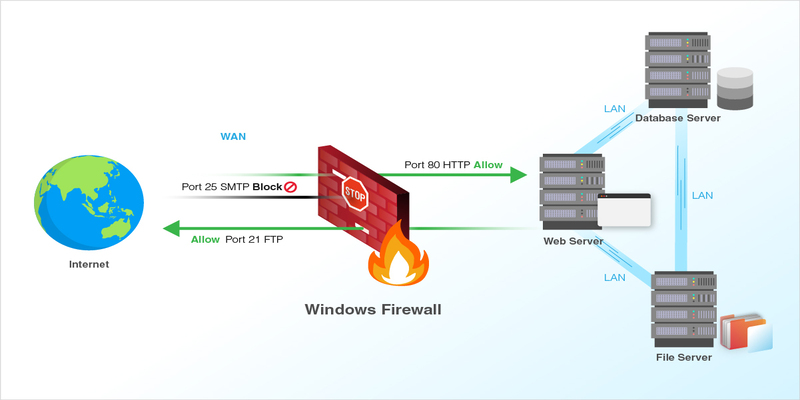
Step-by-step guide to implement a multi-layered firewall configuration
Once the architectural need is clear, system administrators can begin configuring defensive utilities on their host machines. This guide outlines a clean, manual workflow to establish both network-level and application-level filtering rules.
To complete the defensive deployment successfully, implement these consecutive technical phases:
- Configure the Network-Level Barrier: Access the native operating system security utilities to block all unneeded communication pathways, explicitly leaving open only secure web ports like 80 and 443.
- Deploy an Application-Layer Filter: Install a specialized Web Application Firewall (WAF) module directly into the Nginx or Apache server engine to actively monitor incoming HTTP traffic streams.
- Enforce Automated Intrusion Rules: Integrate real-time log scanning software that automatically drops and bans remote IP addresses exhibiting hostile behavior, such as excessive failed administrative login attempts.
Successfully linking these technical components creates a resilient defensive web that handles malicious traffic automatically on the backend. When engineering teams Setup web firewall utilities using this structured approach, they drastically lower manual monitoring hours and ensure the server filters out threats smoothly without slowing down legitimate user connections.
Advanced rule tuning and continuous monitoring for enterprise-grade defense
READ MORE : 8 Common Myths About Secure Domain Privacy Protection Debunked
The final phase of server hardening involves customizing individual filter rules to prevent false positives while maximizing data protection across your entire network block.
Essential post-installation tuning and validation steps include:
- Transition from Monitoring to Enforcing Mode: Begin by running new filter rules in log-only mode to analyze traffic patterns, then switch to active blocking once you confirm legitimate traffic passes smoothly.
- Establish Geo-Blocking Parameters: Restrict or heavily challenge traffic originating from geographical zones outside your core target market to eliminate unnecessary background attack vectors.
Adhering to these strict validation checks is exactly how elite web properties and major international streaming networks like thomo hôm nay preserve total data integrity during severe network distribution incidents. Reviewing the expert security blueprints featured on Web hosting solutions allows webmasters to choose hosting environments that naturally integrate with these advanced protection rules.
Taking the time to Setup web firewall frameworks using a methodical, multi-layered approach guarantees that your publishing platform remains incredibly fast, highly reputable, and fully protected against modern cyber attacks. By systematically hardening your network ports, deploying intelligent application-layer filters, and tuning rules based on live traffic data, you build an ironclad gateway for your online presence. Explore the top cloud configurations today to protect your digital assets with complete operational confidence.
SOURCE: https://web-hosting.solutions
CATEGORY: Guide