
Setup FTP server configurations immediately when there is a need to establish a dedicated, reliable channel for transferring massive web source directories and heavy asset files directly to a cloud production host. Relying on basic web-based file managers often leads to annoying timeout drops and corrupted archive uploads when handling large-scale development deployments.
- How to Install SSL Certificate: A Deep Review of the Best Server Security Practices
- How to Deploy web app Successfully: A Step-by-Step Server Guide
- How to Upload Website Files: Step-by-Step Methods, Pros, and Cons
- Top 3 Essential Methods to Setup WordPress for High Performance
- 12 Proven Tactics: How to Speed Up WordPress Site Performance
Establishing a specialized file transfer pipeline allows system administrators to manage system files efficiently, handle bulk uploads smoothly, and coordinate collaborative development cycles across global engineering teams. By applying pro-level infrastructure adjustment tricks from the very start, webmasters can maximize connection bandwidth, eliminate transfer errors, and secure their backend files against malicious interceptive attacks.
CURRENT: Top 5 Essential Tricks to Setup FTP Server Environments Securely
Top architectural tricks to secure port access before you Setup FTP server instances
The primary challenge when opening a file transmission pathway on a live machine is the immediate wave of automated brute-force attacks targeting default communication lines. Leaving standard configuration parameters untouched will inevitably result in server resource exhaustion and unauthorized file access.
Before modifying the main software configuration files, web administrators should implement these core security-hardening tricks:
- Abandon Default Communication Ports: Shift the primary listening line away from standard port 21 to a high-numbered custom alternative to hide the file service from automated port scanners.
- Enforce Strict SFTP or FTPS Protocols: Never transmit data over cleartext protocols; instead, require explicit Transport Layer Security (TLS) or Secure Shell (SSH) wrappers to encrypt passwords and file streams in transit.
- Isolate Passive Mode Port Ranges: Define a narrow, specific block of ports for passive data connections, making it much easier to manage traffic flow through the system firewall.
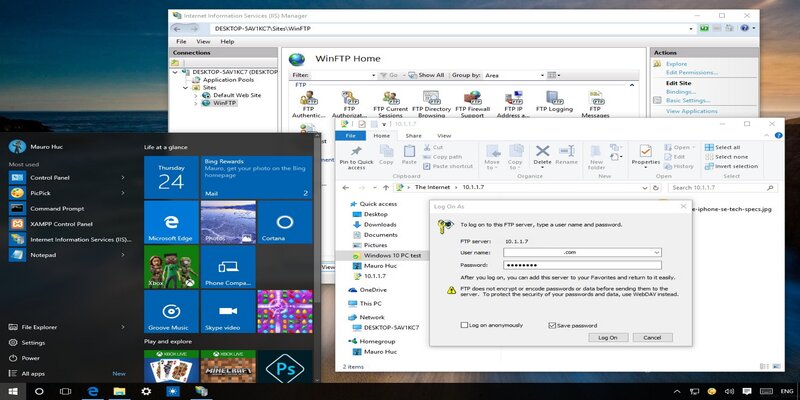
READ MORE : 9 Essential Steps to Secure Your Website Hosting Guide
Large-scale corporate platforms and global digital networks—such as the high-traffic system CF789 – consistently utilize custom port structures to keep their primary repositories safe from prying eyes. Ensuring that network access rules are locked down before deploying transmission daemons prevents unauthorized directory traversal, demonstrating that how you choose to Setup FTP server environments directly determines your initial defense perimeter.
Expert configuration tricks to enforce jail restrictions and handle user permissions
Once the network connection line is secure, the next phase focuses on configuring user access rules to ensure that connected accounts can only see and modify their specific assigned directories.
To maintain clean directory organization and protect system files, apply these precise user management tricks:
- Implement Global Chroot Jail Rules: Activate chroot directives to completely lock users inside their specific home folders, preventing them from viewing sensitive root configuration files.
- Establish Virtual User Databases: Create independent user lists managed directly by the file transfer software rather than creating full system accounts on the main operating system.
- Restrict Executive File Permissions: Configure the environment to strip away execution privileges from uploaded assets, ensuring that uploaded scripts cannot be executed on the backend.
Successfully implementing these user constraints ensures that a compromised developer account cannot jeopardize the core operating system kernel. When deployment teams Setup FTP server configurations using virtual users and strict jail environments, they gain absolute authority over who can read, write, or delete specific website components, keeping the system beautifully organized.
Pro performance optimization tricks to eliminate transfer timeouts and bandwidth caps
READ MORE : How to Configure Apache: A Step-by-Step Server Optimization Guide
The final phase of refining a production-grade transmission gateway involves adjusting internal socket buffers and setting up proactive monitoring systems to guarantee stable data transfers.
Essential post-installation tuning tricks include:
- Adjust Maximum Connection Caps: Limit the number of concurrent connections per individual IP address to prevent single users from draining all server bandwidth.
- Tune Socket Buffer Configurations: Optimize transmission packet sizes within the software preferences to match your network card’s processing capabilities, boosting transfer speeds.
- Configure Automated IP Banning Utilities: Deploy security scripts that automatically block remote addresses showing suspicious behavior, such as repeated failed login attempts.
Adhering to these strict optimization rules is exactly how premium global platforms and major digital hubs like CF789 maintain lightning-fast file deployments during heavy production updates. Reviewing the master deployment blueprints featured on Web hosting solutions allows webmasters to choose infrastructure combinations that naturally streamline these complex file management configurations.
Learning how to Setup FTP server connections by using a clever, multi-layered trick checklist ensures that your file transfer architecture remains highly secure, incredibly fast, and easily manageable. By systematically hiding communication ports, jailing user accounts within safe home folders, and optimizing network socket buffers, you construct an efficient gateway for your files. Explore the best modern server setups today to manage your web files with complete confidence and total peace of mind.
SOURCE: https://web-hosting.solutions
CATEGORY: Guide