
WordPress cloud hosting provides a dynamic, scalable alternative to traditional hosting by distributing your website’s data across a cluster of interconnected servers rather than a single machine. At Web hosting solutions, we observe that many site owners outgrow standard packages, making the transition to cloud architecture an essential step for maintaining speed, uptime, and reliability in a competitive digital landscape.
- Best WordPress Hosting – Secure, Fast, and Easy to Use
- Top 7 WooCommerce Hosting Solutions for High-Converting Stores 2026
- 9 Leading Business WordPress Hosting Services for E-commerce & SaaS
- 10 Best Fast WordPress Server Providers to Boost Speed (2026)
- 7 Effective WordPress Hosting Troubleshooting Tips for Faster Sites
Understanding WordPress Cloud Hosting
WordPress cloud hosting operates on the principle of virtualization, where your resources are not tied to a single piece of hardware. Instead, your site benefits from the combined power of an entire network. If one server experiences a hardware failure, your site automatically switches to another node, ensuring near-perfect availability.
CURRENT: WordPress Cloud Hosting vs. Shared Hosting: Which is Best?
- Elastic Resources: You can instantly scale CPU, RAM, and bandwidth to handle sudden traffic spikes during marketing campaigns.
- High Availability: Cloud environments eliminate single points of failure, making your site more resilient to hardware crashes.
- Performance Optimization: Because resources are virtualized, you avoid the resource contention commonly found in older hosting models.
- Geographic Flexibility: Many cloud providers allow you to deploy your site in specific regions closer to your target audience to reduce latency.
Deploying WordPress cloud hosting allows your website to fully leverage the immense power of a virtualized server network. This modern technology solution ensures your site maintains impressive access speeds and exceptional load-handling capabilities, keeping your content available to users at all times.
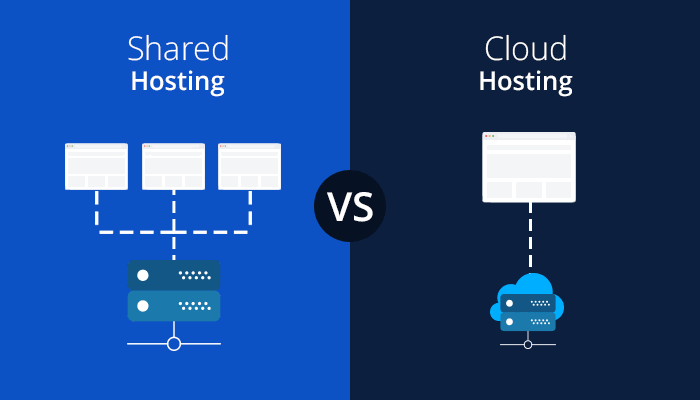
WordPress Cloud Hosting vs. Shared Hosting: Key Differences
Choosing the right foundation is critical. Use this table to understand how WordPress cloud hosting differentiates itself from traditional shared environments.
| Feature | Shared Hosting | WordPress Cloud Hosting |
| Resource Allocation | Shared with others | Dedicated/Scalable virtual pool |
| Performance | Variable, prone to slowdowns | Consistent, high-performance |
| Reliability | Dependent on single server | High, automatic failover |
| Scalability | Very limited | Instant and elastic |
| Price | Extremely low entry | Moderate to premium |
| Technical Need | Low | Moderate to high |
READ MORE : Managed WordPress Hosting Solutions: Powering High-Performance Stores
When comparing options, WordPress cloud hosting consistently outperforms shared alternatives due to its flexible and stable resource allocation. If you prioritize sustainable growth for your business, migrating from basic shared hosting to cloud infrastructure is a necessary and highly strategic move.
Why You Should Switch to Cloud Architecture
Switching to a WordPress cloud hosting environment is often the single most impactful move for business growth. When your store or blog relies on speed to convert visitors, the benefits of the cloud become immediately apparent.
- Minimized Downtime: The self-healing nature of cloud networks means your store stays online even during server maintenance.
- Faster Load Times: With resource isolation, your site isn’t slowed down by “noisy neighbors” consuming excessive bandwidth.
- Future-Proofing: As your traffic grows, you can increase your resource capacity with a few clicks rather than migrating to a new host.
- Improved SEO: Search engines prioritize fast, reliable websites, giving cloud-hosted sites a competitive advantage in rankings.
Top Providers for WordPress Cloud Hosting
Depending on your business size and technical comfort, several providers lead the market in delivering high-quality WordPress cloud hosting experiences.
- Cloudways: An excellent platform that lets you choose top-tier cloud providers like Google Cloud or AWS with a managed interface.
- Kinsta: Offers a premium, fully managed cloud environment powered by Google Cloud, ideal for high-traffic enterprises.
- SiteGround: Provides a balance of user-friendly management and robust cloud infrastructure for growing small businesses.
- Rocket.net: Focuses on edge-computing, ensuring your WordPress site is distributed across a massive global network.
- DigitalOcean: Best for developers who want a raw, high-performance cloud infrastructure with full control at a lower cost.
Tailoring Cloud Hosting to Your Business Needs
The suitability of WordPress cloud hosting often depends on your specific industry and the scale of your digital operations.
- Small Businesses: If you are a boutique store, look for managed cloud services that handle server updates for you, keeping costs predictable.
- Large Enterprises: High-volume e-commerce stores require the auto-scaling capabilities and load balancing found in premium cloud plans.
- Agencies & Developers: For those managing multiple client sites, cloud platforms with centralized dashboards offer unmatched efficiency and time savings.
- Content-Heavy Blogs: If your site has high media traffic, a cloud host with integrated CDN support is essential to maintain fast image delivery.
Estimated Pricing and Budgeting
READ MORE : 10 Best Fast WordPress Server Providers to Boost Speed (2026)
WordPress cloud hosting is generally more expensive than shared hosting, but it offers better value per visitor.
- Entry-Level Managed Cloud: Expect to pay between $10 and $30 per month for small business plans.
- Performance-Focused Managed Plans: Pricing usually ranges from $35 to $150 per month, covering high traffic and advanced support.
- Developer-Managed Cloud: If you are comfortable managing your own server, you can find entry-level virtual private servers for as low as $5 to $10 per month.
- Variable Cost Models: Some providers use a “pay-as-you-grow” model, where you only pay for the resources you use during specific traffic cycles.
Implementation Strategies for Success
To get the most out of WordPress cloud hosting, follow these professional implementation tips to ensure your setup remains optimized.
- Use Caching Plugins: Even on powerful cloud servers, using a caching plugin reduces the load on your database and improves response times.
- Configure CDN Services: Integrate a Content Delivery Network like Cloudflare to serve static content from the network edge.
- Monitor Resource Usage: Use your provider’s dashboard to track traffic patterns and scale resources ahead of scheduled marketing events.
- Maintain Regular Backups: Although the cloud is reliable, always keep an off-site backup of your database and media files.
- Test Staging Environments: Utilize the cloning tools most cloud hosts provide to test theme and plugin updates before deploying them live.
Conclusion
WordPress cloud hosting is the superior choice for any website owner looking to prioritize performance, reliability, and growth. By moving beyond the limitations of shared infrastructure, you empower your site to handle traffic surges and provide a consistent user experience. While it requires a slightly higher investment, the peace of mind and SEO advantages make it a foundational element for long-term digital success. Use this guide to evaluate your needs and choose the right cloud provider to host your vision.
SOURCE: https://web-hosting.solutions
CATEGORY: WordPress Hosting